- Published on
- · July 10, 2026
What is SMTP: the essential email sending protocol
- Blog

- Henrico Piubello
- Henrico Piubello
- IT Specialist - Grupo Voitto
IT Specialist - Grupo Voitto

SMTP (Simple Mail Transfer Protocol) is the application-layer protocol that transfers email messages from the sender's server to the recipient. Standardized by RFC 5321, it operates over TCP on port 25 and is the foundation of email on the Internet.
- What is SMTP and what is it for?
- How does email sending work in SMTP?
- What are the commands of the SMTP protocol?
- Why does SMTP only use 7-bit ASCII?
- What is the difference between SMTP, IMAP and POP3?
- Which ports does SMTP use: 25, 465 or 587?
- Why does SMTP still matter in 2026?
What is SMTP and what is it for?
SMTP (Simple Mail Transfer Protocol) is the main application-layer protocol for email on the Internet. Its function is to transport messages from the sender's mail server to the recipient's mail server, relying on the reliable service of the TCP protocol (Transmission Control Protocol) to ensure error-free delivery.
Like most application protocols, SMTP operates on two sides: the client side, which runs on the sender's mail server, and the server side, which runs on the recipient's mail server. Each mail server implements both: when sending mail, it acts as an SMTP client; when receiving it, it acts as an SMTP server.
Email is an asynchronous communication, allowing messages to be sent and received without synchronization with the recipient. Compared to traditional mail, electronic email stands out for its speed, ease of distribution and affordable cost, with features such as attachments, hyperlinks and HTML formatting.
How does email sending work in SMTP?
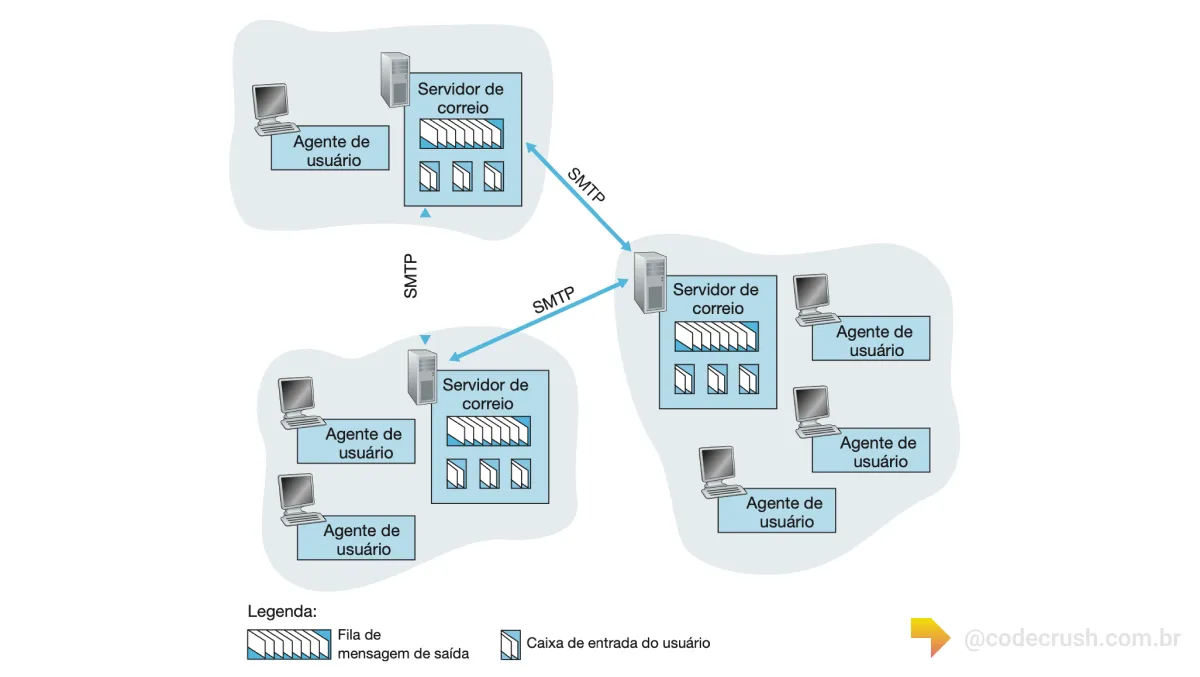
SMTP works by connecting three fundamental components of the email system. The message leaves a client application, passes through the sender's mail server and is delivered directly to the recipient's server, where it is stored until read. The three components are:
- User agents — applications that allow reading, replying, forwarding, saving and creating messages, such as Microsoft Outlook and Apple Mail.
- Mail servers — host users' mailboxes and queue outgoing and incoming messages.
- SMTP protocol — transfers messages from the sender's server to the recipient's server.
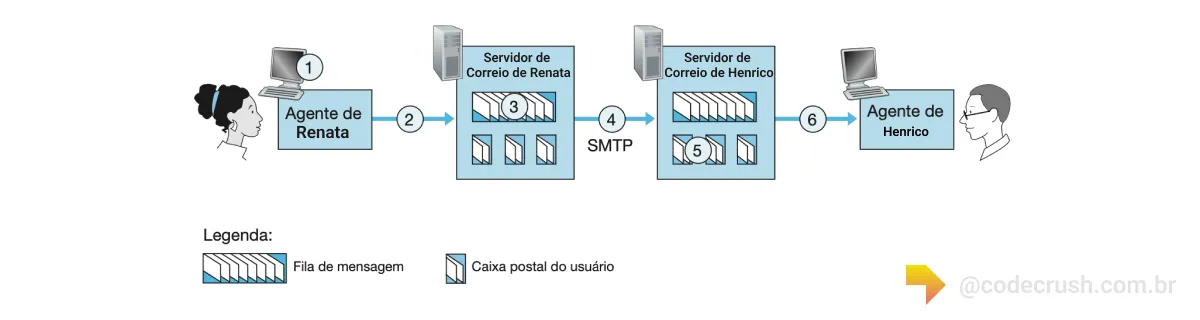
Imagine Renata sends an email to Henrico. When Renata finishes the message, her user agent forwards it to her mail server, where it is queued for outgoing. Renata's server then opens a direct connection with Henrico's server and transfers the message, which is deposited in Henrico's mailbox. When Henrico wants to read it, his user agent retrieves the message, after the server authenticates his identity by username and password.
SMTP does not use intermediate servers: even if Renata's server is in Hong Kong and Henrico's in St. Louis, the TCP connection is established directly between the two. If Henrico's server is down, Renata's server holds the message in a queue and periodically retries sending it — generally every 30 minutes. After several days without success, the message is removed and Renata is notified.
What are the commands of the SMTP protocol?
SMTP is a text-based protocol: client and server exchange commands in ASCII (American Standard Code for Information Interchange) and responses with numeric codes. The client issues commands such as HELO, MAIL FROM, RCPT TO, DATA and QUIT, and the server responds to each with a three-digit code and an optional explanation in English.
The process begins when the SMTP client establishes a TCP connection on port 25 with the recipient's server. After an initial handshake, client and server introduce themselves: the client specifies the sender and recipient addresses and then transmits the message body. See a real example of a dialogue between a client (C) and an SMTP server (S), right after the TCP connection:
S: 220 hamburger.edu
C: HELO crepes.fr
S: 250 Hello crepes.fr, pleased to meet you
C: MAIL FROM: <Renata@crepes.fr>
S: 250 Renata@crepes.fr ... Sender ok
C: RCPT TO: <Henrico@hamburger.edu>
S: 250 Henrico@hamburger.edu ... Recipient ok
C: DATA
S: 354 Enter mail, end with a line containing only "."
C: Do you like ketchup?
C: How about pickles?
C: .
S: 250 Message accepted for delivery
C: QUIT
S: 221 hamburger.edu closing connection
Each message ends with a line containing only a period (.), represented by CRLF.CRLF, where CR is "carriage return" and LF is "line feed". SMTP uses persistent connections: if the sending server has multiple messages for the same recipient, all travel over the same TCP connection, and the QUIT command is only issued at the end. You can reproduce this dialogue yourself with Telnet in the terminal, typing telnet server 25.
Why does SMTP only use 7-bit ASCII?
SMTP historically restricts the message body to 7-bit ASCII format. This limitation made sense in the 1980s, when bandwidth was scarce and multimedia attachments were rare. Defined in the original specification, the rule has become an outdated feature of the protocol in the multimedia era.
In practice, this means that binary data — images, audio, video or any attachment — needs to be encoded to ASCII before sending and decoded back at the destination. This extra work is handled by the MIME (Multipurpose Internet Mail Extensions) standard, which defines how to package non-text content within an SMTP message. Unlike HTTP, which carries binary data natively, SMTP carries this heritage from its origins.
What is the difference between SMTP, IMAP and POP3?
SMTP handles sending messages; IMAP and POP3 handle receiving. That is, SMTP pushes the email to the servers, while the other two protocols allow the recipient's client to download or query the messages already delivered to the mailbox. This division of roles is the basis of how email works.
| Protocol | Function | Typical use |
|---|---|---|
| SMTP | Sending and relay between servers | Sending emails |
| IMAP | Receiving with synchronization | Multiple devices |
| POP3 | Receiving and local download | A single device |
IMAP (Internet Message Access Protocol) keeps messages on the server and syncs state between phone, laptop and webmail. POP3 (Post Office Protocol version 3) tends to download messages to the device and remove them from the server. For sending, however, both depend on SMTP: there is no consolidated alternative for transferring email between servers on the Internet.
Which ports does SMTP use: 25, 465 or 587?
SMTP uses three main ports, each for a different purpose. Port 25 is reserved for relay between servers (from one MTA to another). Port 587 is recommended for submission from clients, and port 465 offers SMTP over implicit TLS. Modern providers prioritize 587 and 465 for authenticated and secure sending.
Submission via port 587 is defined by RFC 6409 and requires authentication (SMTP AUTH) and encryption via STARTTLS, separating user sending from relay between servers. Since SMTP was born without built-in security, these layers are essential for information security: STARTTLS encrypts the transport, while SPF, DKIM and DMARC combat sender forgery. This same reasoning of encrypted channels appears in other infrastructure protocols, such as secure communication between servers via SSH. The routing of which server receives each domain, in turn, depends on the MX records queried in the distributed DNS structure.
Why does SMTP still matter in 2026?
SMTP remains the backbone of one of the most used channels on the planet. According to the Radicati Group, about 376 billion emails were exchanged per day in 2025, with projected growth for the following years. All this sending traffic passes, at some point, through an SMTP server.
The user base is also gigantic: Statista estimates 4.59 billion email users worldwide in 2025, more than half the global population. And the protocol proves remarkably durable — RFC 5321, from October 2008, is still the current specification, and it itself succeeds RFC 821, from 1982. Few Internet technologies remain so central for more than four decades.
For developers, mastering SMTP is practical: sending transactional emails, configuring mail servers, debugging deliveries with Telnet and integrating sending APIs all require understanding this client-server dialogue. At CodeCrush, we treat SMTP as a fundamental building block of any system that needs to notify, authenticate or communicate with users via email.
Conclusion
SMTP proves that a good abstraction ages well: a simple text protocol, born in 1982, still moves hundreds of billions of messages a day with apparent ease. If you develop any system that sends emails, it is worth understanding the HELO/MAIL FROM/RCPT TO dialogue and, above all, adopting the modern layers — port 587, STARTTLS, SPF, DKIM and DMARC. SMTP delivers the message; security and delivery reputation are your responsibility.
Recommended for this topic
Picked by the editors — only what we would use.
## faq
Frequently asked questions
What is SMTP for?
SMTP is used to send and transport email messages between mail servers on the Internet. It carries the message from the sender's server to the recipient's server reliably, using TCP. Every email client that sends messages, like Outlook or Gmail, depends on SMTP for this step.
What is the difference between SMTP, IMAP and POP3?
SMTP is the sending protocol: it pushes outgoing messages to servers. IMAP and POP3 are receiving protocols, used by the client to download or query messages in the mailbox. IMAP keeps emails on the server and syncs multiple devices; POP3 usually downloads them locally.
Which port does SMTP use: 25, 465 or 587?
Port 25 is used for relay between servers (MTA to MTA). Port 587 is recommended for submission from clients, with authentication and STARTTLS, per RFC 6409. Port 465 offers SMTP over implicit TLS (SMTPS). Modern providers prefer 587 or 465 for authenticated sending.
Is SMTP secure by default?
No. Original SMTP transmits in plain text and requires neither authentication nor encryption. Security comes from extensions: STARTTLS encrypts the connection, SMTP AUTH requires login and password, and SPF, DKIM and DMARC combat sender forgery. Without these layers, email is exposed to interception and spoofing.
How to test an SMTP server manually?
Use Telnet in the terminal with the command "telnet server 25" to open a direct TCP connection with the mail server. After receiving code 220, type the HELO, MAIL FROM, RCPT TO, DATA and QUIT commands in order. It is the classic way to inspect the SMTP dialogue and debug delivery.
Topics in this article
## continue lendo
Artigos relacionados


Keep browsing
Previous article

Software testing: types, tools, and best practices
Software testing checks whether a system works as expected and detects bugs before delivery, reducing costs, risks, and rework.
Read moreNext article

Projects, Programs and Portfolios: what is the difference?
A project is a temporary effort, a program coordinates related projects and a portfolio groups initiatives aligned with strategy. See the differences.
Read moreAbout the author
