- Published on
- · July 10, 2026
How to build a standout GitHub: a guide for devs
- Blog

- Henrico Piubello
- Henrico Piubello
- IT Specialist - Grupo Voitto
IT Specialist - Grupo Voitto
A standout GitHub works as a technical portfolio: it proves your skills through organized repositories, a clear profile README, descriptive commits, and open-source contributions. Recruiters evaluate candidates by their profile, and this guide shows how to structure yours, from the README to the contribution history.
- Why is GitHub important for developers?
- How to build a standout GitHub profile?
- Git best practices that elevate your profile
- How to increase your GitHub visibility?
- Conclusion
Why is GitHub important for developers?
GitHub is important because it became the de facto standard for hosting code and collaborating on software: it is where employers, recruiters, and other developers verify what you actually build, beyond what is written on the resume. A well-maintained profile proves technical skills, versioning discipline, and the ability to collaborate on a team.
The numbers show the scale of this showcase. According to the Octoverse 2025 report from GitHub itself, the platform surpassed 180 million developers in 2025 — "a new developer joins GitHub every second", on average — and registered nearly 1 billion commits in the year, up 25.1% over 2024. The foundation of all this is Git, the version control system used by 93.9% of developers, according to the Stack Overflow Developer Survey 2022.
In practice, four reasons justify investing in your profile:
- Technical portfolio: GitHub shows your real knowledge, the languages you master, and how you write code.
- Professional visibility: recruiters and employers consult GitHub profiles to evaluate candidates in hiring processes.
- Open-source contributions: working on open projects generates a public record of collaboration and connects you to other developers.
- Personal development: the profile also records study projects and demonstrates genuine interest in evolving in programming.
How to build a standout GitHub profile?
To build a standout GitHub profile, focus on four fronts: a profile README that introduces you, organized repositories with clear descriptions, projects that prove specific skills, and a readable commit history. The table summarizes what cannot be missing:
| Element | Role on the profile | Practical tip |
|---|---|---|
| Profile README | Introduces you and your stack | Include bio, technologies, and links |
| Pinned repositories | Showcase of the best projects | Pin four to six projects |
| Descriptions and topics | Give quick context to each project | Use tags like frontend and backend |
| Per-project README | Explains the goal and how to run | Document setup, stack, and use cases |
| Descriptive commits | Make the history readable | Avoid generic messages like update |
| Open-source contributions | Prove real collaboration | Start with beginner issues |
Create a quality profile README
The profile README is the introduction to your portfolio: a special repository with the same name as your username, whose content GitHub displays at the top of the page, per the official GitHub documentation. A good README is organized, visually appealing, and easy to understand.
See the example from my GitHub:
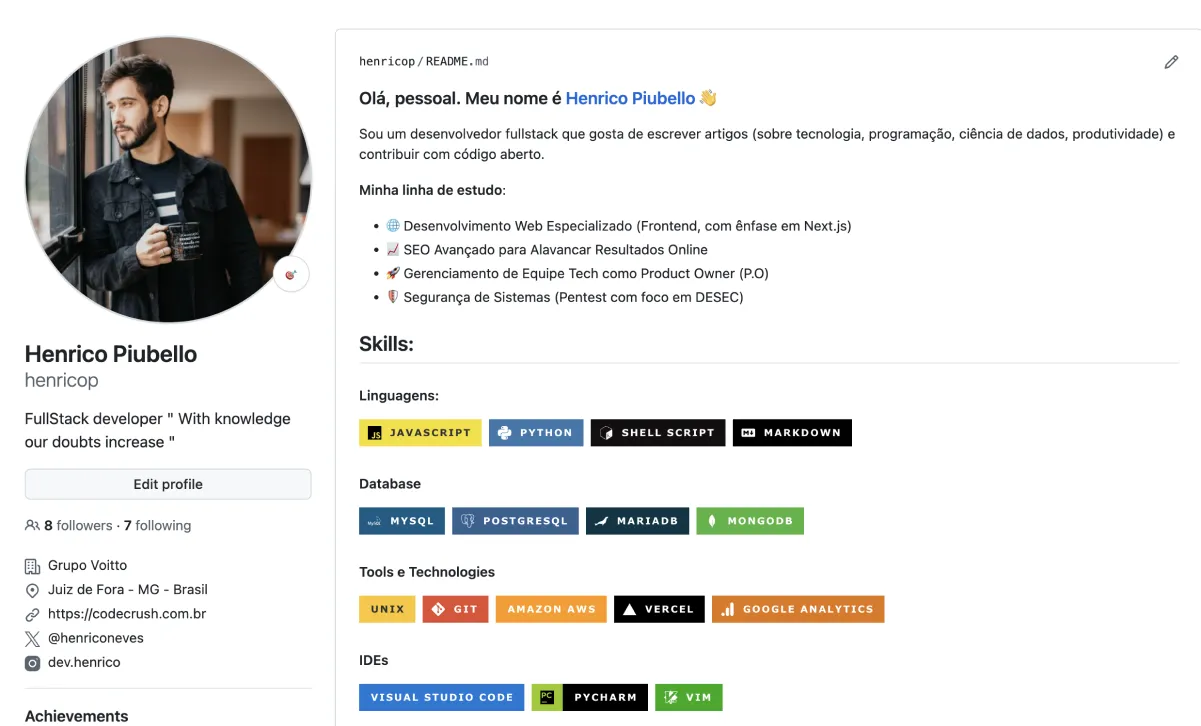
To write yours, follow these steps:
- Write a brief description about yourself and your programming experience.
- Add links to professional networks, such as LinkedIn, and to your portfolio site.
- Highlight your best projects with links to the corresponding repositories.
- List the languages and tools you master, such as Git, Python, and JavaScript.
Organize your repositories
A disorganized profile — projects with no clear title or description — gives a bad impression in seconds. To stay organized:
- Name repositories clearly and objectively.
- Add a short description to each project.
- Use topics to categorize repositories, such as frontend, backend, and machine learning.
- Include an individual README.md in each repository, explaining what the project does, the technologies used, how to run the code, and the use cases.
Choose projects that prove skills
A common mistake is accumulating repositories without a single project that truly highlights your skills — quality matters more than quantity. These four types of project impress:
- Personal projects: solve a real problem you know; a portfolio site built with React is a good starting point.
- Open-source contributions: participate in open projects to collaborate on code that is actually used and expand your connections.
- Clones of popular apps: recreating simplified versions of apps like Instagram or Netflix demonstrates the ability to build commercial-level solutions.
- Projects with automated tests: including software tests with tools like Jest or PyTest shows a development practice focused on quality.
Git best practices that elevate your profile
Git best practices turn your repositories history into proof of professionalism: whoever opens your project can understand what was done, when, and why. Three habits make the difference:
- Frequent and descriptive commits: avoid generic messages like "update" or "fix"; each commit should clearly reflect the change made.
- Organized branches: work with one branch per feature or fix; models like Git Flow help keep everything in order.
- Detailed Pull Requests (PR): create PRs for your changes with descriptions explaining what is being modified and why — even in solo projects, this documents your decisions.
How to increase your GitHub visibility?
To increase your GitHub visibility, combine constant production with exposure: participate in challenges, contribute to open source, link the profile on your resume, and keep regular activity. Five practical strategies:
- Participate in hackathons and programming challenges: short-term competitions generate new projects for the profile and prove your ability to deliver under pressure — see these sites with programming challenges to get started.
- Contribute to open-source projects: it is one of the quickest ways to gain visibility; projects like React, Linux, and Node.js welcome new contributors, and the official Open Source Guides explains how to take the first step.
- Add GitHub to your resume: include direct links to your profile and to your best projects when creating your developer resume — it is a differentiator in hiring processes.
- Keep the profile active: regular commits, even small tweaks to old projects, show continuous evolution; if you are studying, create repositories for daily practice.
- Create and share Gists: Gists let you publish useful code snippets and share them on social networks and programming communities.
Conclusion
Building a standout GitHub is less about code volume and more about curation: a well-written profile README, half a dozen documented projects, and a readable commit history say more about you than a hundred abandoned repositories. Treat the profile as a product — review, update, and retire old projects — because, in a market with more than 180 million developers on the platform, those who stand out are the ones who make the evaluator job easier. Here at CodeCrush, the recommendation is to start today: pick a repository, write a decent README, and pin it to your profile.
Recommended for this topic
Picked by the editors — only what we would use.
## faq
Frequently asked questions
What is the GitHub profile README for?
The profile README is the front page of your GitHub: a special repository with your username whose content appears at the top of the profile. It serves to summarize who you are, your stack, your best projects, and professional links, acting as the cover of your portfolio.
How many projects do I need on GitHub to impress recruiters?
Quality matters more than quantity: four to six well-documented projects, with a README explaining the goal, technologies, and how to run them, impress more than dozens of empty repositories. Prioritize projects that solve real problems, include automated tests, and use the technologies from the job you are applying for.
Do recruiters really look at the GitHub profile?
Yes. In development hiring processes, GitHub is often evaluated as a technical portfolio complementary to the resume. Technical recruiters observe repository organization, commit clarity, activity consistency, and open-source contributions to estimate seniority and good practices before the technical interview.
Is it worth contributing to open source as a beginner?
Yes. Open-source projects accept contributions from all levels: documentation, translation, simple bug fixes, and issues tagged as "good first issue". In addition to practicing Git and code review on real projects, you expand your professional network and create a public, verifiable record of collaboration.
What are Gists on GitHub and when to use them?
Gists are code snippets hosted by GitHub, ideal for sharing useful snippets without creating a full repository. Use them for automation scripts, configuration files, and solutions to common problems. Public Gists can be shared in communities and social networks, reinforcing your technical presence.
Topics in this article
## continue lendo
Artigos relacionados


Keep browsing
Previous article

Is It Worth Studying Programming in 2026?
Yes, it is worth it: Brazil graduates only 53 thousand IT professionals a year against far larger demand, and AI raises the value of who can program.
Read moreNext article

GPU: how graphics cards drove the AI era
A GPU is a processor with thousands of parallel cores that accelerates neural network training, scientific simulations and graphics rendering.
Read moreAbout the author
